Hide Your Home Address: 20 Areas Max
You work from your kitchen table. Your tools are in your garage. Your truck is in your drive. Then one day a man you do not know knocks on your front door. He says, "Google said this is your shop. Can you fix my sink now?" Your kids are in the next room. You did not want this. You just wanted calls for work. This post shows you how to fix that, step by step. You can hide your home address. You can still show up on Google. You can still get calls. You just tell Google the towns you will drive to, not the house where you sleep.
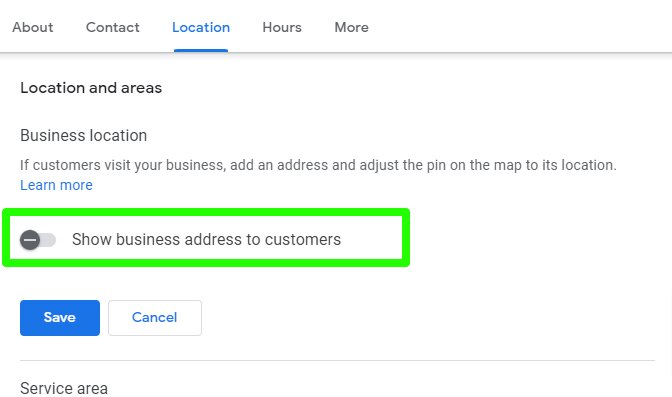
If you do not serve customers at your business address, take the address off your Google Business Profile and set service areas instead. You can list up to 20 service areas by city name or by postal code. That hides your home and still tells customers where you will go to do the work.
What is a Google Business Profile?
A Google Business Profile is your free listing on Google. Listing means the card people see when they search. When a person types "plumber near me" on Google or on Google Maps, Google shows cards. Each card has a name, a phone number, hours, and reviews. Reviews are notes from past customers who rate your work with stars.
Your profile is that card. You control what it says. If it shows your home street address, then any person who finds the card can come to your home. If it shows no street address, but shows a list of towns, then people know you work in their town, but they do not know where you live.
Think of it like a work sign on your truck. Your truck sign says your name and your phone number. It does not say where you park the truck at night. Your profile should work the same way. Name and phone number, yes. Home address, no, if customers do not come to your home for work.
There is a second way to see it. Think of your profile as a flyer you pin to a board in town. You want the flyer to say what you do and how to call you. You do not pin a map to your home on that board. You pin the list of towns where you will take a job. That is the whole idea in this post.
Why would you hide your address at all?
There are three big reasons, and each one is plain.
First, safety. Safety means keeping you and your family safe from harm. If your home address is on Google, strangers can find your door at any hour. Some will be kind. Some will be mad about a job. Some will just be lost and think your home is a shop that is open. You do not need that risk when the fix takes a few taps.
Second, trust. A customer who drives to a house that looks like a house, not a shop, may turn around and leave. He may think the listing was fake. Fake means not real. A clear service area list looks more true for a business that comes to the customer. It sets the right hope from the start: "We come to you."
Third, the rules. Google has rules for profiles. If you do not serve customers at the address you list, Google can flag your profile. Flag means Google marks it as a problem and may hide it or ask you to fix it. A flagged profile can stop showing up in search. That means fewer calls. So hiding the address is not just a choice you like. For many home based firms, it is the right way to follow the rule.

What is a service area business?
A service area is the land where you will go to do work. A service area business is a business that visits customers or brings things to them. It does not serve them at its own address.
Here are clear cases. A plumber drives to homes and fixes pipes there. A cleaning crew drives to homes and cleans there. A lawn crew drives to yards and cuts grass there. A mobile car repair worker drives to the car and fixes it where it sits. In each case, the work takes place at the customer's place, not at the worker's place. The worker's home or base is just where the tools rest at night.
Now here are cases that are not pure service area work. A barber shop where people sit in chairs at the shop. A bakery where people walk in and buy bread at the counter. A tax office where people sit at a desk with the tax worker. Those places serve people at their own address. People are meant to come in. So those places should show their address.
Some firms do both. That is the next part.
What is a hybrid business?
Hybrid means mixed, or two ways in one. A hybrid business serves customers at its address and also visits or delivers to customers away from that address.
Say you have a small shop with a real sign. People can walk in from 9 in the morning to 5 in the day and get help at the counter. But you also drive out to homes in the next towns to do installs. Install means to put in and set up a thing so it works. You do both kinds of work, in both kinds of places.
Google lets a hybrid business show its address and set service areas too. Both facts are true, so both can show.
But there is a hard rule here. If you show an address as a hybrid business, that address must be staffed in your stated hours. Staffed means a real person from your business is there to serve customers during those hours. You can not list hours of 9 to 5 and then leave the place empty all day while you are out on jobs. If no one is there, do not show the address as a place customers can visit.
Think of it like a shop door. If the sign on the door says "Open 9 to 5," a person should be inside at 10 to help. If the shop is in fact your home and no one serves walk in guests there, the door sign is not true. Make the profile true. Hide the address and list the areas.
The sign rule helps here too. If you do not have a permanent sign at your place, list as a service area business. Permanent means fixed in place and not moved. A sign on your truck does not count as a sign on a building. A paper note taped to your home door does not count. The rule is a good test: can a stranger walk up, see a fixed business sign, and be served there in your hours? If the answer is no, you are a service area business.
How many service areas can you add?
You can set up to 20 service areas. That is the max. Max is short for maximum, the most you are allowed.
You name each area in one of these ways: by city or town name, by postal code, or by another named area that Google knows, such as a county. A postal code is the number code for mail in an area, like a ZIP code.
You add them one by one. There is no bulk add. Bulk means all at once in one step. Plan time to type each one and check it.
Do the math before you start. Say you work in 1 home town plus 14 towns near it. That is 1 + 14 = 15 areas. 15 is less than 20, so all 15 fit, and you have 20 - 15 = 5 spots left. Say you want 23 towns. 23 is more than 20, so 23 - 20 = 3 towns will not fit. You must pick the 20 that bring the most good work and drop the last 3, or group some towns under one larger named area if Google offers it and it is true.
Pick with care. Put first the towns where you get the most calls. Put next the towns where the jobs pay well and the drive is short. Leave off far towns where you lose more time on the road than the job is worth. A short list of true, well served towns beats a long list you can not serve well.
Here is a worked case. A cleaning crew is based in one town. They can do 4 homes in a day if the homes are close. If they add a far town, they spend 1 hour to drive there and 1 hour to drive back. That is 2 hours on the road for 1 home. On that day they can only clean 3 homes, not 4. 4 - 1 = 3. The far town cost them a whole job. So they keep their list to towns they can reach fast, even though the max is 20.
Can you set your service area as a circle on a map?
No. You can not set a service area as a radius. A radius is a line from a center point to the edge of a circle. Some tools let you draw a circle and say "I work 10 miles in all ways from here." Google Business Profile does not let you do that.
You must name real areas. City name, postal code, or other named area. One by one.
Why does this matter? A circle can cut a town in half. One side of a street would be in, the other side would be out, and customers would be confused. Named areas are clear. A person in a named town knows he is in. A person in a town you did not name knows to ask first.
It also stops a common mistake. A new owner draws a big circle that covers land he will never drive to. Then he gets calls from far places, says no over and over, and looks bad in reviews. Named areas force you to think town by town. Is this town true work for us? Can we get there fast? Can we do good work there week after week? If yes, add it. If no, leave it off.
How far should your service area reach?
Your whole service area should stay within about 2 hours of driving time from where the business is based. Base means the place your work starts from each day, even if that base is your home and the address is hidden.
About 2 hours is a guide for the far edge, not a goal to hit. Most firms should stay much closer. Think about a full day. Drive out: up to 2 hours. Do the job: say 1 hour. Drive back: up to 2 hours. That is 2 + 1 + 2 = 5 hours for 1 job. If your work day is 8 hours, you have 8 - 5 = 3 hours left for all other jobs, calls, and food. That math shows why the far edge is a limit, not a plan. A job at the far edge should be rare and should pay well.
A good test is the repeat test. Repeat means you do it again and again. Could you drive to that far town 3 days in a row and still do good work and still get home safe? If not, the town is too far for your list, even if it fits in the 2 hour guide on a good traffic day. Traffic means the cars on the road that slow you down. A town that is 1 hour away at 7 in the morning may be 2 hours away at 5 in the day. Use the slow time, not the fast time, when you choose.
Why do you get only one profile for your whole area?
A service area business gets one profile for the whole area it serves. Not one per town.
This rule stops spam. Spam here means many thin listings made just to show up more times. If each town got its own profile, one plumber could fill the whole map with 20 cards that are all the same firm. Google does not allow that.
One profile is also better for you. All your reviews land in one place. Say you have 30 reviews. 30 reviews on 1 profile look strong. If you split them as 2 reviews each on 15 profiles, 15 x 2 = 30, the same total, but each card looks weak. A customer trusts the card with 30 reviews more than a card with 2. One home for reviews, hours, photos, and phone number is easier to keep true too. When your phone number changes, you fix it once, not 15 times.
If you had old extra profiles for towns, do not keep adding to them and hope. Write down the links and dates first, so you have a record. Then ask for help to close or merge the extra ones, and put your work into the one true profile. Keep the one with the most reviews and the most true facts, if you must choose.
How do you hide your address, step by step?
Here is the fix, in order. Go slow. Check each step.
Step 1: Open your Google Business Profile. Sign in with the Google account that owns the profile. Owner means the account that has the right to change it. If you see more than one listing with your name, pick the one that is live and has your reviews. Live means people can see it in search now.
Step 2: Find the edit area for your profile info. Look for the place where you edit name, hours, phone, and location. Location means where the business is and where it serves.
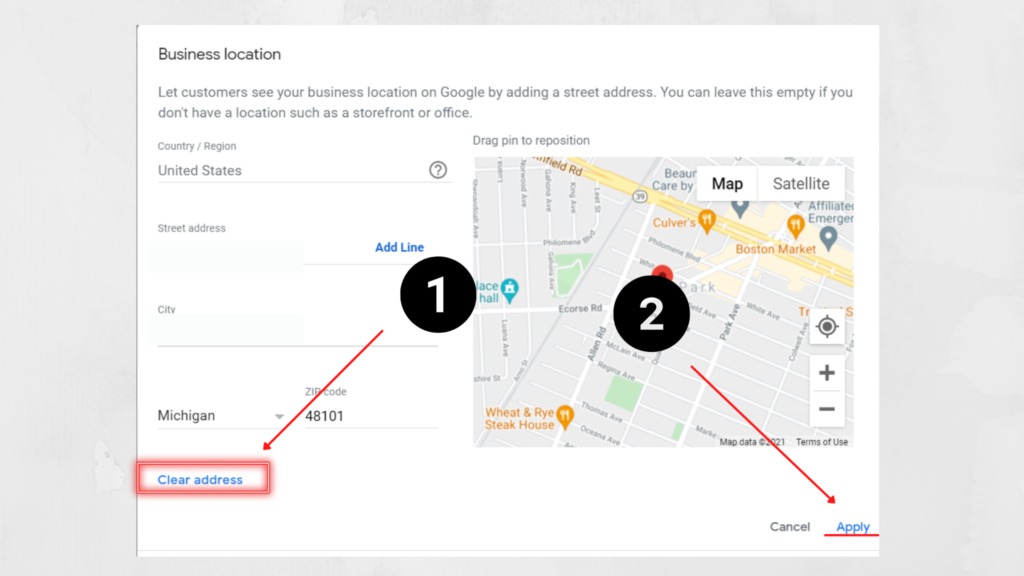
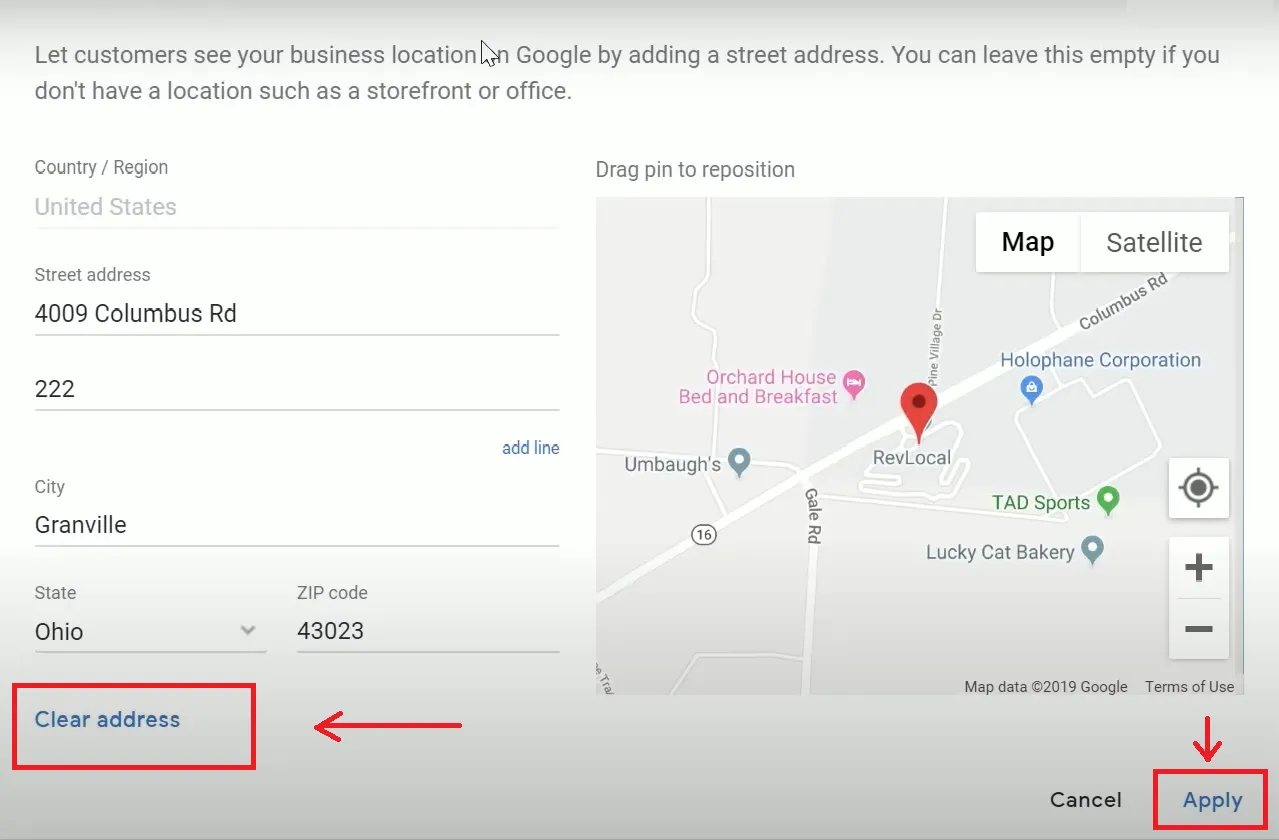
Step 3: Go to the location part. You will see your street address if it is shown now. That is the part to change.
Step 4: Remove the address. Clear the street address fields so no home address shows to the public. Do not just change the street number or hide one line. Remove it as the public address, the way Google's edit screen lets you. If the screen asks if you serve customers at this address, say no, if that is true.
Step 5: Add your first service area. Type the city name or postal code. Pick the exact match Google shows in the list. Do not pick a near name that is a different town with a like name. Check the state too, if the screen shows it.
Step 6: Add each other service area one by one. Type, pick, save, repeat. Count as you go. 1, 2, 3, up to your list, but never more than 20.
Step 7: Check your hours, phone, and name are still true. A fix to location should not change those, but check anyway. One wrong digit in a phone number can cost a week of calls.
Step 8: Save. Then wait and check again later. Service area edits can take up to 48 hours to show. 48 hours is 2 full days. 24 hours in a day x 2 = 48. Do not panic if you still see the old address an hour later. Check again the next day, and again the day after, from a fresh search, not just the edit screen.
Step 9: Test like a customer. Search for your kind of work plus one of your towns, in a private window if you can. Private window means a browser window that does not use your sign in. See what a stranger sees. Your home address should not show. Your service area should show instead.
Write down the date you made the change and the date you saw it live. That record helps if you need to ask for help later.
What if you have a real shop and you also travel?
Then you may be a hybrid business, and you may show both.
Here is a worked case. A lock shop has a real store. The store has a fixed sign, a counter, and a worker at the counter from 9 to 5, Monday to Friday. That is 5 days a week, 8 hours a day, 5 x 8 = 40 hours a week with staff at the shop. The same firm also drives a van to homes in 8 towns to open locked doors and change locks there. That firm can show the shop address and list the 8 towns as service areas. Both facts are true and both help customers. Walk in customers use the address. Home customers use the area list.
Now change one fact. The shop closes for a month and all work is by van only. Then the firm is not hybrid for that month. It should hide the shop address for that time or update its facts to match what is true, and list service areas. When the shop opens again with staff and a sign, it can show the address again. The profile must match real life, week by week, not just the best week you hope for.
What are the most common mistakes?
Mistake 1: Leaving the address and adding areas too, when you never serve at the address. Strangers still come to your home, and the profile still breaks the rule. If you do not serve there, remove the address. Do not keep it "just in case."
Mistake 2: Adding towns you will not drive to. This brings calls you must turn down. Turn downs waste your time and can bring bad reviews from people you never served. Keep the list true and tight.
Mistake 3: Adding 20 areas on day one with no plan. Start with your core towns, the ones you serve each week. Core means the center and most used part. You can add more later, up to 20, as your work grows.
Mistake 4: Using a radius in your head and then being shocked Google uses named areas. Plan by names from the start. Make a paper list of town names and postal codes before you open the edit screen.
Mistake 5: Listing a post office box or a mail shop as your address to hide your home. A post office box is a mail box at the post office, not a place you serve customers. That does not fix the rule and can cause a new flag. The true fix is no public address plus service areas.
Mistake 6: Putting your home address in photos or posts. A photo of your house number, or a post that says "come by our home at" — those undo your fix. Look at your photos and past posts. Remove any that show your home street number, if safety is your goal.
Mistake 7: Forgetting to check on a phone. Most customers search on a phone. Check your card on a phone screen, not just a big computer screen. Make sure the phone number taps to call and the areas read clear on a small screen.
Your free tool for this step
Once your address is hidden and your areas are set, check the rest of your profile with the GMB Profile Grader on Aid & Cos at https://aidcos.world/#free-tools
The GMB Profile Grader is a guided check. Guided means it walks you step by step. It gives your profile a letter grade from A to F, like a school grade. A is the best. F is the worst. It does not just give a grade and leave you stuck. It names the 3 fixes that matter most for your profile. That way you know what to do first, second, and third, and you do not waste a day on a small thing while a big thing stays broken.
Use it after this fix. You just fixed location, which is a big thing. The grader may show that your next big things are photos, hours, or the way your name and services are listed. Do the 3 fixes it names, in order. Then run the check again after your edits show. Grade first, fix in order, check again. That loop is how a weak profile gets strong, one true fix at a time.
The tool is free. Go to https://aidcos.world/#free-tools and look for the GMB Profile Grader. Bring your profile name as the tool asks, and follow the steps on the page.

The bottom line
If customers do not come to your address for work, your address should not be on Google. Take it off. List the towns you serve instead, up to 20 areas max, named by city or postal code, not by a radius. Keep the whole area within about 2 hours of your base, with most work much closer. Keep one profile for the whole area, so all your reviews and trust build in one place. If you have a real shop with a fixed sign and staff in your hours and you also travel, you are hybrid and you can show both the address and the areas — but only while both facts stay true.
Do the edit today, in the steps above. Add each area one by one. Save. Wait up to 48 hours. Test like a stranger. Then grade the profile and fix the next 3 things. Your home stays your home. Your work still shows up where your customers search. That is the right split, and Google's own rules back it.
Part of: Google Business Profile Help: Costs, Fixes, and Guides for Local Businesses
More guides in this branch:
Keep reading: all Aid & Cos deep-dives