1 Post a Week Keeps You in Local Search
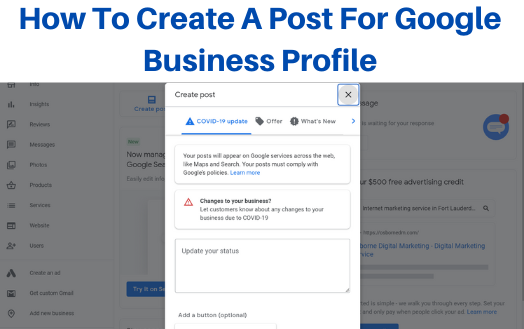
Your Google listing is up. Your name, hours, and phone are right. Then weeks pass, and the listing just sits there, saying the same thing it said on day one. Buyers near you search, find two shops like yours, and pick the one that looks alive — the one with a fresh photo and a note from this week. That fresh note is a Google post, and it takes less time than you think. One post a week is the small habit that keeps your shop in the local talk. This post shows you where the post button is, what the three kinds of posts are, how to make your first one today, and how to keep the habit all year with no stress.
A Google post is a short note with a photo that you add to your Business Profile, and buyers see it on Google Search and Google Maps. To make one, go to your profile, tap the Add post or Add update flow, pick the kind of post — What's New, Event, or Offer — add a clear photo and two or three short lines, add a button if you want one, and post it. Do that one time each week. One post a week is 1 × 4 = 4 posts in most months, and 1 × 52 = 52 posts in a full year.
What is a Google post, in plain words?
A post is a small, fresh note on your listing. Think of your listing like the front window of your shop. The sign on the glass — your name and hours — stays the same all year. But a good shop puts a fresh card in the window each week: "New stock in." "Class this Saturday." "This week only: free check with each job." Folks who walk past read the card and think, "That shop is open, busy, and on top of things." A Google post is that card, but in your window on Search and Maps, where far more folks walk past each day.
The card can hold text, a photo, or a short video clip. A buyer who searches for your shop, or for your trade in your town, can see your post right on your profile. That is the whole point: the post sits at the exact spot where a buyer is about to choose.
Here is the hard idea in this post, said two ways, because it is the one worth getting right. The hard idea is this: a post does not work like a flyer you pin up once and leave for a year. It works best as a fresh, steady flow.
First way: think of your post like fresh bread on a shelf. Bread baked today gets picked up. Bread from last month gets passed by, even if the recipe is the same. Each new post is a fresh loaf. It tells buyers, "We are here, today, doing this work, today." When the loaf is old, the shelf looks bare, and buyers move on to the shop next door with fresh bread out.
Second way: think of your post like a wave to a friend across the street. One wave says hello. A wave each time you see them keeps the bond warm. If you wave once in spring and then never again, by fall you are near strangers. One short post a week is that wave. It is small, it is kind, and it keeps your shop in the buyer's mind as a live, known place — not a name they saw once and forgot.
So the goal is not one great post. The goal is a calm rhythm: 1 post, each week, all year. Rhythm beats rush. Rush burns out in week three. Rhythm is still going in month nine, and month nine is where the lead grows wide.
Where do you find the post button?
You post from the same place you run your profile. Here is the path, in the order you will tap it:
Step 1. Log in with the Google account that owns your profile. Owner means the account with full control of the listing. A staff account may see less, so use the owner account for this job.
Step 2. Go to your Business Profile. You can get there from Google Search by searching your exact shop name while logged in, or from your profile home on the web.
Step 3. Look for the posts part of the profile. On the profile you will see a choice named Posts, with an Add post choice, or a flow named Add update. Wording can shift a bit by screen and by phone or desk use, but the sense is the same: Posts is the door, and Add is the way in.
Step 4. Tap Add post or Add update. The post form opens. That form is where the next part of this guide lives.
If you cannot find the posts part at all, check two things. First, are you logged in as the owner? A logged-out view hides the tools. Second, is your profile in good standing? A profile with a pause on it must be fixed first, and only then can it post again. A clean, live profile is the base this whole habit stands on.
What are the three kinds of posts you can make?
Google gives you three main kinds of posts. Pick the kind by the job the post must do:
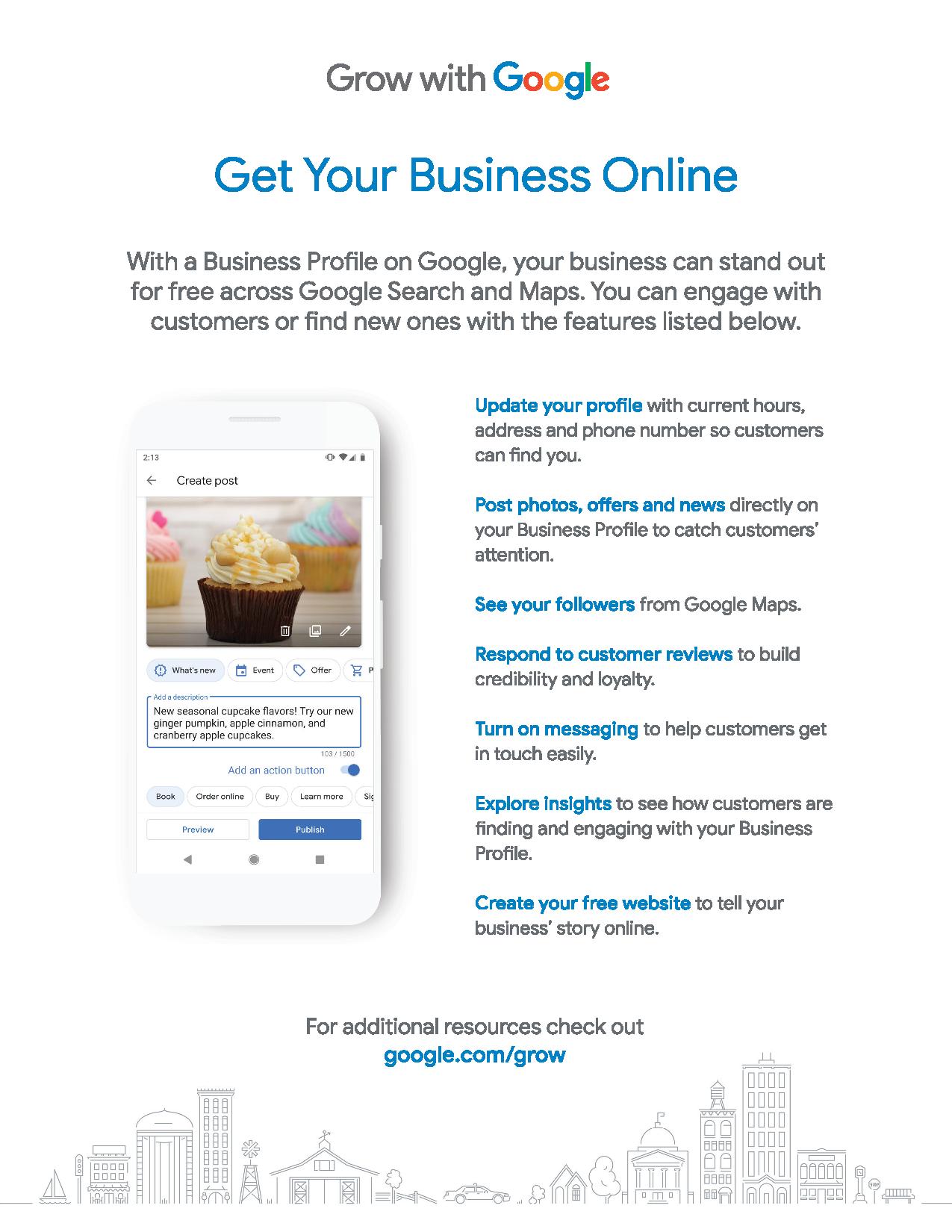
Kind 1. What's New. This is the all-use post — Google also shows it as an update. Use it for news, tips, new work, new stock, or a photo of a job you just did. If you are not sure which kind to pick, pick this one. Most of your weekly posts will be What's New posts.
Kind 2. Event. Use this when a thing has a set date and time: a class, a sale day, a free clinic, a grand open day. An event post carries the date, so the buyer sees when the thing takes place. Use it only for real, dated things. A tip with no date is not an event.
Kind 3. Offer. Use this when you give a deal with clear terms: what the deal is, when it starts, when it ends, and any code or terms the buyer needs. Terms are the rules of the deal — who can use it, and what it does not cover. If your deal has no end date and no terms, it is not yet an offer. Write it as a What's New post, or set the terms first and then post the offer right.
Here is how a real month might mix the three kinds. Week 1: a What's New post with a photo of a fresh job. Week 2: a What's New post with a tip. Week 3: an Offer post for a true, dated deal. Week 4: an Event post for a class — or a What's New post if no event is near. The count is 3 What's New + 1 special = 4 posts for the month. That mix keeps the window fresh with no strain, and most weeks ask for the same easy kind.
How do you make your first post, step by step?
Let us make a What's New post from start to end. Have one good photo ready before you start. A photo of real work — your hands, your tools, your shop, your finished job — beats a stock photo each time. Stock means a bought photo of some other place. Buyers can smell stock, and so can trust.
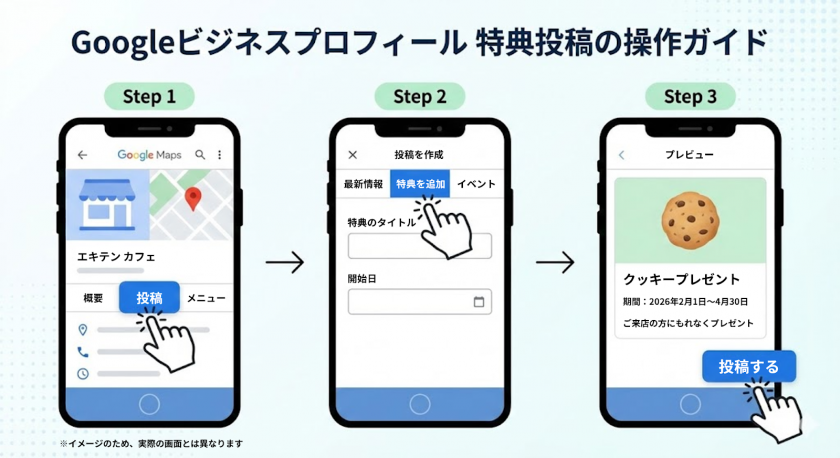
Step 1. Open your profile and tap Posts, then Add post.
Step 2. Pick the kind. For this first post, pick What's New (Update).
Step 3. Add your photo. Pick the clear shot. Check that it is bright, not cut off, and shows the one thing the post is about. One post, one thing. A photo of a finished kitchen sink fix goes with words about that fix — not with words about your whole trade.
Step 4. Write your words in the text box. Keep it short: two or three lines is plenty for most posts. Line one says what is new. Line two says why it helps the buyer. Line three says what to do next. Here is a shape to copy with your own true facts: "We fixed a burst pipe for a family on Oak Street this week. A small leak can waste a lot of water fast, so we check all joints twice before we leave. Call us if you see a wet spot under your sink." Three lines, one true job, one true tip, one clear next step.
Step 5. Add a button if the flow gives you one. A button is a small bar the buyer can tap, like Call now, Learn more, or Book. Pick the button that fits the post. If the post is about a job you do, Call now or Book fits. If the post is a tip that leads to a page on your site, Learn more fits. One button is enough. Two buttons split the buyer's mind.
Step 6. Read the whole post once, out loud if you can. Fix any word that is not true, any date that is wrong, and any name that is spelled in a new way. Truth first — then tap Post.
Step 7. Wait for Google to check the post. Google reads posts to be sure they fit its rules for post text and photos. Most clean posts show fast, but a check is part of the deal, so do not panic if the post is not live the same second you tap.
That is it. Your first post is done. Time it, just for your own facts. Most owners land near 10 to 20 minutes for post one. By post four, the same job often takes near 10 minutes, because the path is known and the photo habit is set. 10 minutes × 4 weeks = 40 minutes a month. Less than one hour a month keeps your window fresh all month long.
What should you write when your mind goes blank?
Blank weeks are the weeks that kill the habit. Beat them with a bank of post ideas you can pull from with no thought at all. Here are six kinds of posts that work for most small shops. Rotate them — rotate means use them in turn, so you do not post the same kind each week:
Idea 1. The job you just did. One photo, two lines on the work, one line on how to book the same work. This is proof of life and proof of skill in one post.
Idea 2. The tip of the week. Teach one small thing your buyers get wrong. A plumber teaches how to find the shut-off valve — the valve is the tap that stops water to a part of the home. A baker teaches how long fresh bread keeps. A tip post makes you the kind guide in your trade, and guides get called first.
Idea 3. The meet-the-hands post. Show a real face from your shop, with a true line about what that person does. Buyers pick shops run by folks they feel they know.
Idea 4. The season post. Tie your work to the time of year in true words: heat, cold, rain, school start, holidays. Do not invent a stat or a claim. Just name the season pain your trade truly solves, and show your fix.
Idea 5. The question post. Answer the one question buyers ask you most, in two lines and a photo. If ten buyers asked it at your counter, a hundred more are typing it into Google.
Idea 6. The thank-you post. Thank buyers for a real thing — a full class, a busy sale day, a kind review week — with a photo from the day. Thanks is news too, and it reads as warm, not salesy.
Write these six on a card and keep the card by your desk. Each week, pick the next idea on the card, take one photo, and post. When you reach the end of the card, start at the top again. Six ideas × 9 turns of the card = 54 posts, which is more than a full year of weeks. The card ends the blank-mind problem for good.
How do you pick the one day and time for your weekly post?
Pick a slot you can keep on your worst week, not just your best week. For most owners, that is a calm slot at the start of the work week or the end of it — a time when you are at a desk with your photos near.
Here is a simple way to choose. Look at your last two weeks. Find a 15-minute gap that showed up in both weeks. That gap is real. Put your post in it. A gap that shows up once may not show up again, and a habit built on a fake gap dies fast.
Then guard the slot the way you guard a job for a buyer. If a buyer had booked you for those 15 minutes, you would show up. Book your own shop the same way. Put it on your calendar — a calendar is the day-by-day plan you check each morning — as a set meet with your own listing.
Miss a week? Do not post twice the next week to "catch up." Just post once, on your slot, and move on. Two posts in one week and none the next is the rush path again. One post, on time, each week is the rhythm path. Rhythm is the one Google and your buyers can count on, and counts are what build trust over a year.
Do the year math once and feel how light this habit is. 1 post a week × 52 weeks = 52 posts. At near 10 minutes each, that is 52 × 10 = 520 minutes a year. 520 ÷ 60 = 8 hours and 40 minutes — less than one work day, spread over a whole year, to keep your shop's window fresh each and every week.
What mistakes get a post turned down or make it fall flat?
Google checks posts, and some posts do not pass. Others pass but do no good. Keep clear of these traps:
Trap 1. A phone number in the post text. Posts that put a phone number in the words may be turned down. Your profile already shows your number, and the Call now button does that job. Keep the number out of the text box.
Trap 2. A claim you cannot prove. Do not write "best in town," "number one," or a stat you do not have a source for. Write what you did, where you did it, and what it did for the buyer. True and plain beats bold and thin.
Trap 3. A dark or stock photo. A dim shot of a messy desk, or a bought photo of a stranger's shop, makes the post read as fake. Use your own bright photo of your own work. If the shot is bad, take it again by a window or with the lights on. It takes one minute and saves the post.
Trap 4. Too much in one post. A post about a new hire, a deal, a tip, and a holiday hour change is four posts crushed into one. No buyer reads to the end, and no one acts. Split it: the best one thing goes out this week, and the rest wait their turn in the next weeks. Your idea card from the last part holds them safe.
Trap 5. Words with no place in them. Local search is search by place. A post that never names your town or area gives Google thin thread to link you to near-by buyers. Name your town in true words when it fits: "This week in Coral Gables, we…" Do not stuff the town name in five times. Once, in a true line, is right.
Trap 6. A post and then a long sleep. One post in January and none till June reads as a closed shop, even if you were busy all spring. The fix is not a flood of posts in June. The fix is the weekly slot, kept small and kept always.
How do you know if your weekly posts help?
You will not get a loud bell that says "that post worked." You get small, true signs. Watch for them once a month, in one short check:
Sign 1. Your profile views over time. Views are the count of times folks saw your profile. Do not chase one week's rise or fall. Look at three months side by side. A flat or slow rise with fresh posts each week is a healthy sign for most small shops.
Sign 2. Buyer acts. Acts are calls, direction asks, and website taps that come from the profile. If acts hold or grow while you post each week, the window is doing its job.
Sign 3. The feel at your counter. Do buyers name your posts? "I saw your photo of the sink fix" is gold. When a buyer says a line like that, write it down. That is proof no chart can beat, because it came from a mouth, not a graph.
Sign 4. Your own ease. By month three, does the post take less time and less dread than it did in week one? Ease is a real result. A habit you can keep for years beats a hard push you quit by spring.
What you must not do is judge the whole habit by one post. One post is one wave. Judge the sea, not the wave: look at a full season of weeks, all posted, and then decide what to tune — the photo, the words, the day, the kind. Tune one thing, post for a month, and look again. Small tests, read slow, win.
Your free tool for this step
Use the Week of Post Ideas tool at Aid & Cos, on the free tools page: https://aidcos.world/#free-tools. The tool gives you a ready set of post ideas for your trade, so blank weeks stop at the door. Feed it your kind of work, and it hands back a week of clear ideas you can turn into posts — the job story, the tip, the photo prompt — each one shaped to fit a Google post. Use it on your posting day: pick the idea that fits your week, take the photo it calls for, write your two or three true lines, and post. When you plan a full week of posts at once for a busy spell, the tool fills the plan in minutes, so your rhythm holds even when your shop days do not. It is free to use, and it keeps the hardest part of this habit — "what do I say?" — solved before it can slow you down.
The bottom line
Your listing is your shop window on the busiest street in town. A fresh card in that window each week tells every buyer who finds you: this shop is open, this shop is busy, this shop cares. The steps are small and free. Go to your profile, tap Posts and Add post, pick What's New, Event, or Offer, add one true photo and two or three true lines, add one button, and post it. Then do the same small thing next week, on the same day, at the same time. One post a week is 4 posts most months and 52 posts a year, for less than one work day of time in that whole year. Start this week. Take the photo today, post it on your slot, and let the rhythm do the rest.
Part of: Google Business Profile Help: Costs, Fixes, and Guides for Local Businesses
More guides in this branch:
Keep reading: all Aid & Cos deep-dives