9 Checks Fix Your Google Business Profile Today
Your GBP is often the first thing a guest sees. GBP means Google Business Profile. It is the free Google listing that shows your shop on Search and Maps. It shows your name, hours, phone, photos, and reviews. It can show up before your own web site does.
If that listing is wrong, guests get lost. They call a wrong number. They come when you are closed. They pick the shop down the road whose listing looks clean and full.
The good news is this: you can check and fix the main parts in one day. This post gives you nine checks, in order. Each check is plain. Each check tells you what to look at, what good looks like, and what to fix. Do them in order, and do not skip the last one. The last one makes the rest count.
Set up or claim your GBP, then check nine things: (1) your real business name, with no added words; (2) one main category that says what you are, plus more for what you do; (3) your address, or a service area if you go to guests; (4) phone and web site that match each place they appear; (5) true hours, plus special hours for holidays; (6) a full list of your services in plain words; (7) a clear description of what you do, who for, and where; (8) real photos of your shop, team, and work; (9) verification, done the way Google asks, with no changes to name, address, or category while you wait.
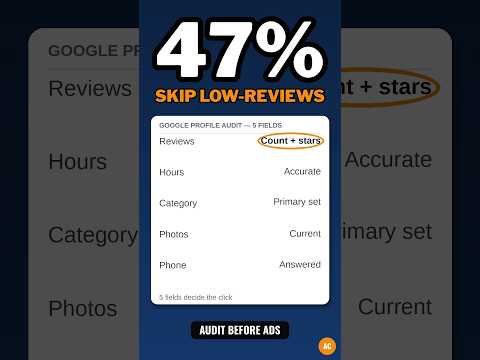
What the video shows: This short video is called "Google Shows 5 Fields Only You Can Fix Before the Click, how to do a google business profile audit." It is about a Google Business Profile audit — checking the fields a guest sees before they decide to click, call, or visit. The 9 checks in this post do that same job in full, field by field, so the name, hours, phone, and photos a guest finds are the true ones.
What is Check 1: Is your name your real name?
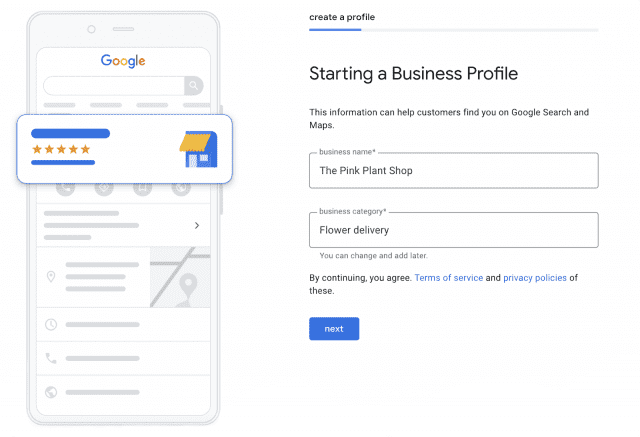
Use the real name of your shop. The name on your sign. The name on your papers. The name guests know.
Do not add extra words to the name to try to rank higher. Do not add your town, your service, or words like "best" or "cheap." For example, if your real name is "Bright Pipe," do not list it as "Bright Pipe Best Plumber Miami." That is called keyword stuffing. Stuffing means cramming in search words that are not part of the real name.
Google can suspend a profile for a stuffed name. Suspend means Google hides your listing until you fix it. A hidden listing earns you nothing while you wait.
Fix: type the name just as it is on your shop sign. If you changed your name in the past, change it in GBP too, and change it in the same way in each place your name appears on the web.
What is Check 2: Does your main category say what you are?
A category is a label that tells Google what kind of business you are. Pick one main category that matches what you ARE, not just one thing you do.
For example, a shop that cuts hair and sells hair goods is a "Hair salon" first. A shop that fixes sinks, pipes, and drains is a "Plumber" first. That main label is the most strong signal you send Google about when to show you.
Then add more categories for what you DO. The hair salon may add a category for braid work or wig sales, if it truly does that work. The plumber may add drain service. Add only true ones. A category for work you do not do brings the wrong guests and bad reviews when they learn the truth.
Fix: read your main category out loud. Ask, "Is this what we are, in two or three words?" If not, change it. Then list each true service and check if a category fits it.
What is Check 3: Is your address right, or should it be hidden?
If guests can visit you at a real place — a shop, an office, a salon — list that address. It must be a real place where your staff work in your open hours. It cannot be a mail box or a fake suite.
If you go to your guests, like a plumber, cleaner, or tutor does, you may hide the address and set a service area. A service area is the zone you travel to for work: a town, a set of towns, or a range in miles. Guests then see your area, not your home address. That keeps your home private and still tells guests if you serve them.
Do not do both in a false way. Do not list a home address as a store front if no guest may ever come there. Do not set an area so wide you would never drive to its edge. A false area wastes calls you will turn down, and turned-down guests leave bad reviews.
Fix: pick one true model. Visit us here, or we come to you there. Set the profile to match it.
What is Check 4: Do your phone and site match in each place?
Guests trust a shop whose facts line up. Search pros call this consistency. It means your name, address, and phone are the same in each place they appear on the web.
Check your GBP phone. Call it. Does it ring the right place? Check the web site link. Does it open your real site, on the right page, with no error? Then check the same facts on your site, your Facebook page, and big directory sites. Is the phone the same digit for digit? Is the name spelled the same way? Is an old address still live on one page?
Small gaps cause real harm. One wrong digit sends calls to a stranger. An old address sends a guest to a closed shop. They blame you, not the old web page.
Fix: make one master list of your name, address, and phone, just as you want them shown. Fix GBP first. Then fix your site. Then fix the rest, one by one.
What is Check 5: Are your hours true, with holiday hours set?
List the hours you are truly open. Not the hours you wish you were open. Not the hours from last year.
Set your normal hours for each day of the week. If you close for lunch, show that gap if the tool lets you split the day. If you are closed one day, mark it closed. A guest who comes to a locked door at a time your listing said "open" may leave a 1-star review, and they will feel they have the right to.
Then set special hours. Special hours are the changed hours for holidays and one-off days: closed on a feast day, short hours on New Year's Eve, long hours for a sale day. Google prompts you to confirm hours near big holidays. Do not skip that prompt. Set the true hours for each holiday you know is coming in the next few months.
Fix: stand at your own door in your mind for each day. "If a guest came at the first and last hour we list, would we be there?" If not, fix the hours now.
What is Check 6: Is your full service list there, in plain words?
GBP lets you list your services. Use that space. List each service you truly offer, with a plain description and a price or price range if you can give one.
Write like a person, not a code book. "Drain clearing — we clear clogged sinks and tubs, same day in most cases" beats a string of jargon no guest knows. Jargon means trade words that most folks do not use. If a term is a trade term, keep it but explain it in the same line.
This list does two jobs. It helps guests see at a glance that you do the exact job they need. And it helps Google match you to searches for that job, in your area, in plain words.
Fix: take your price list or the jobs you did last month. Turn each one into a service line. If you did it and would do it again for pay, it belongs on the list. If you no longer do it, take it off.
What is Check 7: Does your description say what, who, and where?
Your description is a short text that tells guests what your shop does, who it serves, and where it works. Write it in plain words.
Use this shape: "We [do what] for [who] in [where]. We are known for [one or two true strengths]." For example: "We fix sinks, pipes, and water heaters for homes and small shops in Miami. We are known for same-day service and clear, flat prices told to you before work starts."
Do not fill this space with hype. Do not claim you are "number one" or "the best" if you cannot prove it. Do not cram in a list of search words. Write for the guest who reads it on a phone, in a hurry, with a problem to solve.
Fix: read your description to a friend who does not know your trade. If they can say back what you do, who for, and where, in one breath, it works. If not, rewrite it until they can.
What is Check 8: Are your photos real and current?
Add real photos of your shop, your team, and your work. Guests want to see the place they will walk into, the faces they will meet, and the work you have done.
Start with these: the front of your shop in day light, so guests can spot it from the street; the inside, clean and as it truly looks; your team at work, with their okay to be shown; and before-and-after shots of real jobs, if your trade suits that. Add new photos as your shop and work change.
Do not use stock photos and pass them off as yours. Stock photos are generic photos you buy or find, of places and people that are not yours. Guests can feel the lie when they arrive and the place looks nothing like the photo. That gap costs trust, and trust is the whole point of the profile.
Fix: take ten true photos on your phone today. Wipe the lens. Stand still. Use day light near a window or door when you can. Post the best of them, and set a note to add fresh ones each few months.
What is Check 9: Is verification done, and left alone while you wait?
Verification is Google's check that you are a real business at the place or area you claim. Google must verify most profiles before they go fully live. The method varies by business. Google may ask for a video of your shop and tools, a postcard mailed to your address, a phone call, or an email. There is no one method for all. Do the method Google gives YOU, in the steps it gives, with true facts.
While verification is pending, do not change your name, address, or category. Changes during the wait can restart the check and add days or weeks. Fix those fields first (Checks 1 to 3), then submit, then wait with your hands off.
If Google asks for a video, show what it asks for: your sign or work van, your tools, your space, and proof you run the business there. Film it in one clean take if you can, in good light.
Fix: log the date you submitted and the method you used. Check the status in GBP, but do not edit the held fields until the check is done.
What should you do after the nine checks?
Three first steps turn a fixed profile into a live one.
First review ask. Ask each guest for an honest review, in the same way, with no reward and no pressure. Never ask only happy guests. A fair ask sounds like this: "If you have a minute, we would value your honest review on Google. It helps neighbors find us and helps us learn." That is enough.
First post. GBP lets you add posts: short updates with a photo and text. Post one true update. A new service. A seasonal tip. A real photo of a job done well. Posts show guests the shop is alive and cared for.
Monthly 10-minute check. Once a month, spend ten minutes on your profile. Check hours for the next holiday. Add new photos. Reply to any reviews you missed. Fix any fact that changed, like a new phone or new hours. Ten minutes a month keeps the nine checks true all year.
Keep a brief log of each fix you make, with the date. If your listing ever drops or gets suspended, that log helps you and any support staff see what changed and when.
Your free tool for this step: the GMB Profile Grader
Nine checks are a lot to hold in your head at once. The free GMB Profile Grader on aidcos.world walks you through them as a guided checklist. It gives your profile a letter grade, from A to F, and it ranks the 3 highest-impact fixes — the fixes that matter most to do first.
Use it after you finish the checks in this post, as a second set of eyes. Or use it first, to see where you stand, then work the nine checks in the order of its top three fixes. Either way, fix one item at a time and re-check. A grade that climbs from D to B in a day is real progress, and guests will see the change in your listing fast. One free signup opens all the Aid & Cos tools.
The bottom line
Your Google Business Profile is your front door on the web. Run the nine checks today: real name, right category, true address or area, matching phone and site, true hours, full services, plain description, real photos, and clean verification. Then ask fairly for your first review, add your first post, and check the profile for ten minutes each month. A true, full profile earns the calls that a thin or false one loses.
Part of: Google Business Profile Help: Costs, Fixes, and Guides for Local Businesses
More guides in this branch:
Keep reading: all Aid & Cos deep-dives